
How to connect PokéItem to Claude and ChatGPT: a step-by-step guide
Ask for a card's price, what you're missing to finish a set, or add cards to your binder, right from Claude or ChatGPT. The connection guide, step by step.
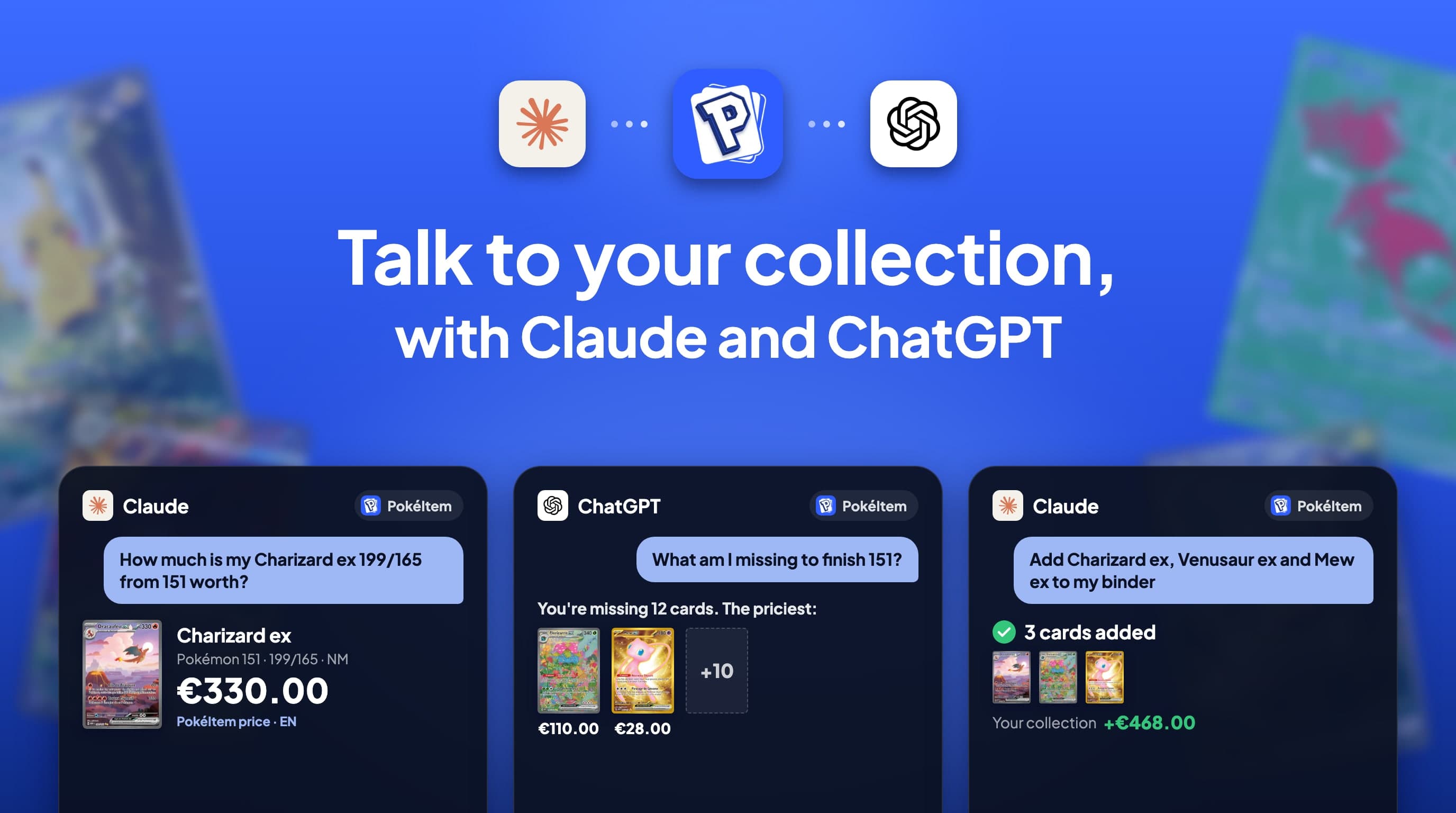
Since November 2026, your PokéItem collection can plug into Claude, ChatGPT and other compatible AI assistants. In practice, you ask your question the way you'd ask a collector friend: "How much is my Charizard ex 199/165 worth?", "What am I missing to finish 151?", "Add these three cards to my binder". The assistant fetches the answer from PokéItem: today's price, your binder, your duplicates, your wishlist.
This guide explains what it is, how to connect it in two minutes, and how to stay in control of what the assistant is allowed to do.
At a glance
| Question | Answer |
|---|---|
| What is it for? | Querying and organising your PokéItem collection in plain language, from your AI assistant |
| Which assistants? | Claude, ChatGPT, Cursor and any MCP-compatible assistant |
| How much does it cost? | Nothing extra: the connector is open to every member, free accounts included |
| What you need | A PokéItem account and an account with your assistant |
| Your password? | It stays with PokéItem: you sign in on a PokéItem page |
| Can you turn it off? | Yes, any time, in Profile → Settings → AI agent |
What is an MCP connector?
MCP (Model Context Protocol) is an open standard that lets an AI assistant use outside services. Without a connector, Claude or ChatGPT know neither your collection nor today's prices: they answer from memory, often with outdated prices. With the PokéItem connector, they call PokéItem directly when you ask your question.
There's nothing to install. PokéItem hosts the connector at this address:
https://api.pokeitem.fr/mcp
Depending on the assistant, you either find it in its connector list, or you paste this address once.
Connect PokéItem to Claude
PokéItem is listed in Claude's official connector directory. That's the easiest route.
- Open the connector page. Go to claude.ai/directory/connectors/pokeitem, or in Claude: Settings → Connectors → Browse connectors, then search for "PokéItem".
- Click "Connect". If you're not signed in to Claude yet, the button reads "Sign in to add".
- Sign in to PokéItem. A PokéItem page opens. Sign in with your PokéItem account (you can also create one at this point).
- Choose the permissions, then "Allow". You're sent back to Claude: you're connected.
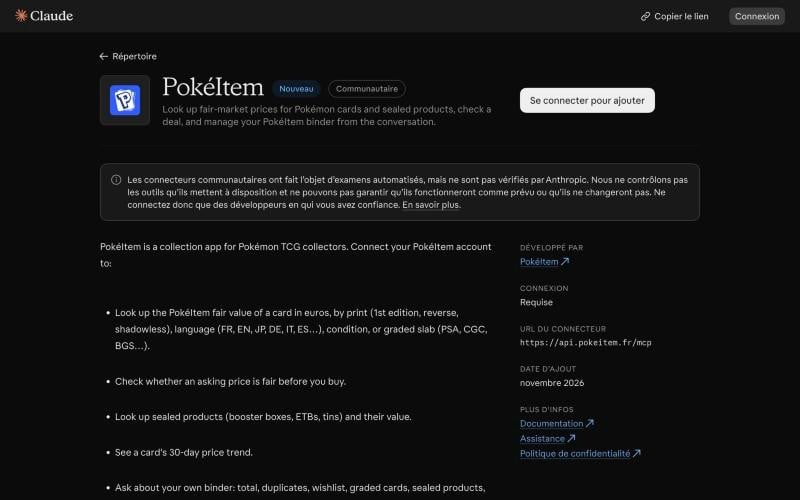
A connector added on claude.ai follows your Claude account: you'll find it in the desktop app and the mobile app too. In a conversation, check that it's turned on in the tools menu, then ask your question.
Connect PokéItem to ChatGPT
In ChatGPT, PokéItem is added as a custom MCP server.
- Open ChatGPT's settings, in the plugins section (or "Apps", depending on your version).
- Add a custom MCP server and paste the address
https://api.pokeitem.fr/mcp. Name it "PokéItem". - Connect your PokéItem account on the page that opens, choose the permissions, then "Allow".
- In a conversation, turn PokéItem on in the tools and ask your question.
Adding a custom server depends on your ChatGPT plan. PokéItem is also coming to ChatGPT's app directory: you'll then simply search for it by name, as in Claude.
The authorisation screen: you choose what the assistant can do
Whatever the assistant, you connect through the same PokéItem page. The assistant never sees your password: it only receives an authorisation limited to the permissions you tick.
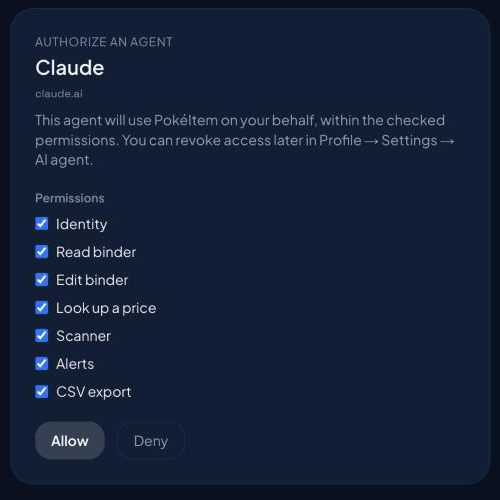
| Permission | What it allows |
|---|---|
| Identity | Knowing which PokéItem account the assistant is talking to |
| Read binder | Summary, search through your cards, duplicates, sealed products, wishlist, graded cards, set completion |
| Edit binder | Adding, changing or removing cards, sealed products and wishes |
| Look up a price | The PokéItem price of a card or sealed product, its history, an opinion on an asking price |
| Scanner | Identifying a card from a photo |
| Alerts | Viewing, creating and removing your price alerts |
| CSV export | Exporting your collection |
You can stick to read-only: untick "Edit binder", and the assistant can look at everything without changing anything. And even with that permission, every deletion asks for your confirmation before it's applied.
What you can ask
Just talk normally. The assistant understands the version, language, condition and grade you describe.
| You want to… | Example question |
|---|---|
| Know a price | "How much is my Charizard ex 199/165 from 151 worth, in English?" |
| A precise price | "And the Base Set Charizard, 1st edition, English, PSA 9?" |
| Check an asking price | "Someone's offering it to me for €280, is that a good deal?" |
| Follow the trend | "How has its price moved over 30 days?" |
| A sealed product | "How much is a Prismatic Evolutions Elite Trainer Box worth?" |
| Take stock | "How much is my binder worth? What are my most valuable cards?" |
| Complete a set | "What am I missing to finish 151? Most expensive first." |
| Manage duplicates | "Which cards do I have duplicates of?" |
| Organise | "Add Charizard ex, Venusaur ex and Mew ex to my binder." |
| Scan | Send a photo: "Which card is this? Add it." |
| Keep watch | "Let me know if this Mew ex drops below €25." |
| Prepare a trade | "If I trade my Mew ex for their Venusaur ex, do I come out ahead?" |
Prices are PokéItem's, updated every 24 hours from the major markets (Cardmarket, eBay, TCGplayer). Listings from selling sites don't show up in the answers.
With Cursor or another assistant: the personal token
Some tools, like Cursor or the Claude desktop app configured by hand, can't open the PokéItem sign-in page. For them, create a personal token:
- In PokéItem, open Profile → Settings → AI agent, then New token.
- Give it a name, tick its permissions and choose its duration (30 days, 90 days or 1 year).
- Copy the configuration shown and paste it into your tool. For Cursor: Settings → MCP.
{
  "mcpServers": {
    "pokeitem": {
      "url": "https://api.pokeitem.fr/mcp",
      "headers": { "Authorization": "Bearer <TOKEN>" }
    }
  }
}
The token is shown only once and gives access to your account within the permissions you chose: keep it to yourself. You can have five active at a time.
Staying in control: the log and revoking access
Everything is managed from one screen: Profile → Settings → AI agent, in the app or on app.pokeitem.fr.
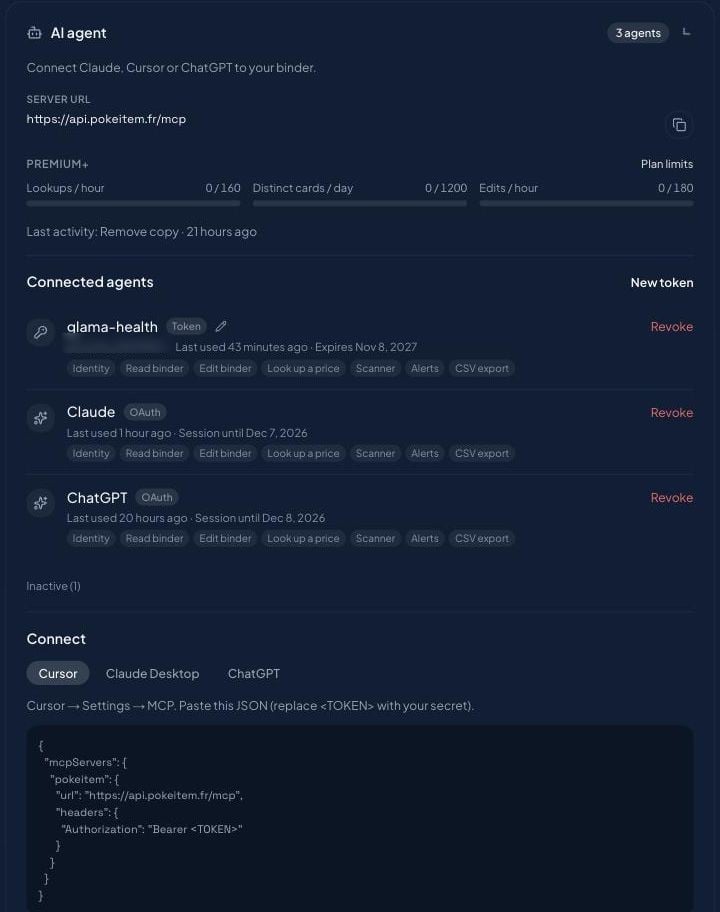
There you'll find:
- connected agents (Claude, ChatGPT, your tokens), with their permissions and last use;
- the "Revoke" button: access stops immediately;
- the activity log for the last 90 days: every call, the tool used and a short summary of the request, exportable as CSV;
- your quotas for the hour and the day.
You can also remove PokéItem directly from your assistant's connector settings.
Limits to know about
To prevent abuse, every account has caps. They're generous for normal use.
| Per hour or per day | Free | Premium | Premium+ |
|---|---|---|---|
| Price lookups / hour | 80 | 120 | 160 |
| Distinct catalogue cards / day | 400 | 800 | 1,200 |
| Binder edits / hour | 30 | 120 | 180 |
| Scans / hour | 20 | 60 | 90 |
Cards already in your binder don't count towards the distinct-cards cap. The cap is lower during a new account's first days, and a search returns at most five results. Your PokéItem account's usual limits also apply.
FAQ
Does PokéItem read my conversations with Claude or ChatGPT?
No. PokéItem only receives the parameters of the call, for example the name of the card you're looking up. The rest of your conversation stays between you and your assistant.
Is the connector paid?
No. It's open to every PokéItem member, free accounts included. Premium and Premium+ only raise the usage caps.
Can the assistant change my binder without my consent?
Only if you gave it the "Edit binder" permission. Every deletion also asks for your confirmation.
Are the prices given by the assistant reliable?
They're PokéItem prices, the same as in the app, updated every 24 hours. Without the connector, an assistant answers from memory, often with outdated prices.
How do I disconnect an assistant?
In Profile → Settings → AI agent, tap "Revoke" next to the assistant. You can also remove it from your assistant's connector settings.
For the technical details (tools, data processed, retention), see the page Using PokéItem in your AI assistant.
Last updated: 9 November 2026
Back to blogAlso worth reading
Track your cards' value day by day
Scan your cards, organise your collection and get price alerts, all on PokéItem.